

Choosing between Lumiform and Quentic involves one key question: do you need a dedicated inspection and audit software or a full EHS management suite?
If inspections are a core, day-to-day activity, ease of use and frontline adoption are major deciding factors, especially for large teams. A full EHS system provides broad compliance oversight and regulatory management, but it comes with higher costs and longer implementation timelines.
To help you make the right choice, this comparison breaks down how Lumiform and Quentic handle inspections specifically, covering pricing, mobile capabilities, form building, corrective actions, and reporting.
What is Lumiform?
Lumiform is a specialized software for businesses with frontline teams to carry out inspections and audits quickly, consistently, and at scale. It connects frontline workers in the field with centralized monitoring and reporting, enabling inspections to be completed on mobile devices, even while offline. At the same time, managers can configure workflows and track results across all sites from a desktop dashboard.
When it comes to inspections, Lumiform stands out with its emphasis on speed, automation depth, and frontline usability:
- AI-powered form builder: Create custom inspection checklists based on your standards and include action-based triggers in minutes without IT help.
- Extensive template library: Access 12,000+ pre-built forms covering inspections across safety, quality, and compliance.
- Automated corrective actions: Failed inspection items automatically trigger assigned tasks for efficient issue resolution.
- Fast deployment: Teams can start running inspections within days, given the platform’s intuitive interface and guided workflows.
The platform’s architecture is optimized for inspections, so identifying an issue, assigning an action, and generating audit-ready reports happen in one seamless process. This makes it especially effective for multi-site businesses that need to run frequent inspections and act on results immediately. It also supports approval tracking and integrated training management as enterprise features.
What is Quentic?
Quentic is a centralized EHSQ management platform that covers compliance, risk, safety, environmental impact, and sustainability. Unlike a dedicated inspection tool, you’ll find inspections and audits as one part of a broader suite that includes incident management, hazardous substances tracking, legal compliance, and environmental reporting.
The platform is built around a central “Core” system that defines organizational structure, users, and data, with modules you can add based on your needs. This modular architecture allows you to tailor the system to your requirements, spanning a wide range of processes, though it means you’ll have to spend more time configuring and planning it. Inspection workflows can also be spread out several parts of the platform, like audits, risk assessments, and action management.
Here are some of Quentic’s key capabilities for EHS inspections:
- Module customization: It offers a broad set of 10+ modules that you can select and combine, with inspections included.
- Compliance-oriented templates: Use pre-built question catalogs and checklists aligned regulatory frameworks.
- Integrated CAPA workflows: Connect inspection findings to formal corrective and preventive action processes with root cause analysis.
- ESG reporting: Track emissions, energy consumption, and environmental metrics.
Lumiform vs Quentic side-by-side comparison
Below, we’ve highlighted the main differences between Lumiform and Quentic when it comes to conducting inspections, including setup, mobile use, and automation:
| Feature |  |  |
|---|---|---|
| Primary focus | Inspections, audits, and checklists at scale | Integrated EHSQ management |
| Typical use cases | HACCP inspections, cleaning and maintenance checklists, vehicle inspections, safety audits | Incident tracking, hazardous materials management, environmental and sustainability reporting, extended EHSQ processes |
| Pricing | From €100/month for 5 users, with key inspection features; volume discounts at scale | Quote-based pricing, depends on number of users and selected modules |
| Mobile app | Purpose-built for frontline use | Reflects the broader EHSQ platform |
| Digital forms & logic | AI form builder with advanced logic; 12,000+ templates | Drag-and-drop editor with question catalogs; less extensive template library |
| AI features | AI across all inspection steps (e.g. form generation, translation, image recognition, data insights) | AI applied across EHS/ESG data management, with emphasis on reporting |
| Workflow automation | Code-free action triggers, automated form sequences, scheduled tasks | Task assignments, escalation rules, reminders tied to EHS processes and regulatory deadlines |
| Action management | Automated action workflows with task assignment, approvals, and response-based triggers | Action tracking across incidents and CAPA processes; capabilities depend on selected modules |
| Training | Training module linked to inspections (Enterprise feature) | Training and qualification management module as part of EGSQ suite |
| Organizational structure | Flexible entity management for locations, equipment, departments, hierarchies | Centralized administration of sites and organizational units; directory for external partners |
| Reporting & analytics | Real-time inspection dashboards, automatic audit-proof reports, BI integrations | EHS reporting and dashboards, including for regulatory compliance and sustainability |
| Integrations | Integrations for data storage, automation, BI, and API/webhooks; connects bi-directionally with ERPs | Integrations via Quentic Connect with systems like SAP, Oracle, Microsoft, and ERP/HR tools |
Lumiform vs Quentic for EHS inspections: Key feature comparison
1. Pricing and platform structure
The pricing models for Lumiform and Quentic reflect their overall platform design:
- Lumiform offers per-user pricing with essential inspection features included right away and volume discounts for larger teams.
- Quentic applies a modular pricing structure where inspection functionality can involve multiple EHS components, typically resulting in higher overall costs.
For Lumiform, pricing follows a per-user model, starting at €100/month for 5 users (approximately €20/user), and the per-user cost decreases as teams scale through volume discounts. Key inspection, action management, and reporting capabilities are available in the base plan without purchasing separate modules. This makes pricing straightforward to understand and budget for, especially for teams primarily looking to do inspections. While Lumiform also offers additional features through higher-tier plans or optional add-ons, the core inspection workflow is available out of the box without complex configuration.
“In the first year alone, we were able to save over 10,000 euros with Lumiform.”
On the other hand, Quentic follows a quote-based pricing model tailored to each organization’s specific requirements. Pricing depends on the number of users and which modules you select from their EHS suite. Organizations typically build their solution by combining modules, such as audits, risk management, and incident management, with inspection workflows potentially spanning several modules depending on the type of inspection.
Certain features like some AI functions may be available as add-ons within specific modules. This provides value for organizations seeking integrated compliance management, but it often results in a higher total cost and less pricing transparency. For teams primarily focused on inspections, this can make Quentic a more expensive option compared to specialized tools.
2. Ease of use and onboarding
Ease of use is another major differentiator between the two platforms. Quentic requires more involved setup and configuration before teams can operate efficiently. Lumiform is designed for deployment within days with minimal training, as it is already purpose-built for inspections.
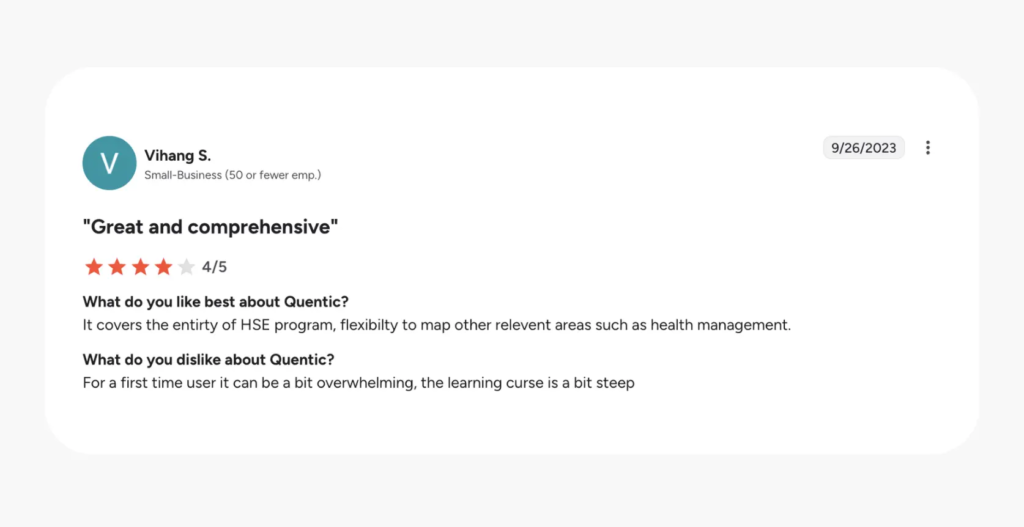
Getting started with Quentic often requires a more extensive setup phase. Because inspections might involve broader modules like risk management, users need to understand the system structure before they can effectively carry out inspections. Quentic even offers services for helping users choose the proper modules, implying that mapping the software to your workflow requires assistance from the first step, and onboarding typically involves workshops or dedicated setup support. Once users learn how one module works, it becomes easier to navigate others over time, but the learning curve can be steeper. The only available G2 review reflects this, though it is older:
With Lumiform’s inspection-focused approach, both managers and frontline workers have to deal with less configuration. Managers can create inspection forms using an intuitive form builder and leverage specialized workflow automation and AI without IT help, while the mobile app keeps the experience straightforward for frontline teams carrying out inspections. In fact, many clients are able to set up templates in a few hours, describing it as easy even without extensive training.
“We started using Lumiform the same day it was activated. We didn’t want to program our own apps, but rather find a solution that’s simple and quick to implement.”
3. Digital form builder
Creating and managing forms is central to EHS processes. In Lumiform, the form builder is designed for speed and flexibility in inspections. It includes features such as conditional logic, action-based triggers, role-based visibility, and AI-powered template generation from prompts or existing documents. Teams can quickly create and adapt checklists without technical expertise, and AI supports multiple steps of the process, including instant translations for international teams. Combined with a library of 12,000+ templates, this allows you to standardize inspections while still adapting forms easily across multiple sites and use cases:
In Quentic, you’ll also find a drag-and-drop form editor for building checklists and questionnaires. It includes predefined question catalogs and templates designed around regulatory standards like ISO frameworks, which helps when you need to create compliant, standardized inspections and audits. Forms are often linked to specific modules, which strengthens integration and traceability but can make them less flexible to adapt quickly for different inspection scenarios. The overall template library is smaller than Lumiform’s, and there’s less AI assistance for creating forms quickly.
Quentic’s forms are embedded within EHS-specific modules, with predefined question catalogs. Lumiform offers stronger form-building flexibility for EHS inspections with its no-code builder and massive library of customizable templates.
4. Mobile app and field usability
Both platforms offer mobile apps with offline functionality. Quentic’s mobile app mirrors its EHS platform, which can be heavier to navigate for inspectors working on the go, while Lumiform is purpose-built for fast, intuitive field inspections. Because of this, frontline users are likely to find Lumiform easier to adopt, while still maintaining thorough and reliable documentation.
Looking more closely at Quentic’s mobile app, it supports offline mode, allowing users to carry out inspections on-site and document findings with photos and notes. It also offers GPS tagging and electronic signatures, which are critical for compliance, and its features follow the desktop app closely, with access to broader analytics such as KPI charts and reports. Because mobile functionality depends on the selected modules, the app can include features that are not always relevant in the field, making the experience feel less focused for frontline users who need to complete tasks quickly.
In comparison, Lumiform’s mobile app is designed for on-the-go inspections. It works seamlessly online and offline, automatically syncing inspection data once connectivity is restored to ensure no data loss during field operations. Inspectors can complete safety checks in warehouses, manufacturing floors, or remote facilities without worrying about internet access. The interface is streamlined for speed while maintaining thoroughness: users can quickly navigate checklists, capture photos, trigger actions, and move to the next inspection while maintaining a thorough audit trail.
5. Action management
When issues are identified during inspections, they need to be addressed quickly and tracked. This becomes especially important at scale, where managers need to maintain the same standards across many sites and teams.
To handle this, Lumiform enables automated corrective actions alongside integrated task management and approvals. Quentic also provides action management with root cause analysis, but its capabilities are more dependent on selected modules, with less response-driven automation.
In Lumiform, failed inspection items automatically generate assigned actions with routing and approvals. Inspections, findings, photos, and actions are captured in one continuous workflow, making it easier to resolve them quickly.
This means:
- Issues gets assigned and managed within the same system for all sites
- Frontline teams can identify a problem during an audit and immediately trigger a corrective action without switching systems or navigating extra steps
- You cut down on administrative overhead, since the platform assigns tasks with deadlines and approvals automatically based on the inspection response.
Quentic offers robust and structured action management as part of its EHS platform. Actions can be created from inspections, audits, or incident reports and assigned with clear ownership, priorities, and deadlines, supported by custom notification rules and tracking mechanisms. The platform also includes corrective and preventive action (CAPA) processes and root cause analysis.
Action management is closely tied to Quentic’s modular system. For example, some features such as work order approvals are only available in certain modules. Because it connects multiple EHSQ processes, its strength lies in managing corrective actions within a wider EHSQ framework. Lumiform’s automations is built around inspections out of the box, using responses and findings from inspections to trigger follow-ups directly.
6. Reporting and analytics
Lumiform focuses on real-time visibility for inspection data, with dashboards that track inspection progress, completion rates, and issues across locations. This way, you can quickly see where standards are being met and where attention is needed. Dashboards are easy to customize, with drag-and-drop configuration and flexible filtering, and you can automatically schedule and share them with stakeholders.
Combined with instant, audit-proof PDF reports, integrations with BI tools like Power BI and Tableau, and AI insights, this enables teams to quickly access and act on inspection findings. At the same time, it maintains a reliable record over time for in-depth analysis.

Quentic offers a compliance-oriented reporting approach, aggregating data across various modules. It provides customizable dashboards, KPI tracking, and automated reports in standardized formats, with ESG and environmental reporting as a strength. However, setting up analytics typically requires initial configuration and a solid understanding of how data flows across modules.
Taken together, Quentic’s analytics span multiple EHS domains.As a result, teams that are focused on inspections may need additional time to set up dashboards and extract insights. Lumiform, on the other hand, keeps reporting connected to the inspection process, so you can trace issues back to specific findings and track progress quickly.
7. AI and workflow automation
Both Quentic and Lumiform are actively expanding their AI and automation capabilities. Where Quentic’s AI features are more focused on decision support and governance, with varying capabilities per module, Lumiform excels at automation specialized for inspections and audits, offering AI assistance across major inspection steps. In practice, this makes inspections significantly faster and reduces manual effort, both for frontline workers and managers.
Looking more closely at Quentic, it offers automation and AI capabilities designed to support EHS processes. It features escalation rules, reminders, and customizable notification logic, with additional checks for permit renewals and compliance deadlines. Many of its AI capabilities lie in supporting analysis for managers or administrators, such as problem-solving with the 5 why’s or assessing trends, rather than enhancing frontline execution directly. Another consideration is these are often tied to specific modules, so their availability and impact can vary depending on the system configuration.
With Lumiform, automation is designed for conveniently setting up inspectionss without coding. It enables automated form sequences, scheduled recurring inspections, and action triggers based on inspection responses, on top of reminders and notification logic. Its AI can generate templates from text prompts, recognize images during inspections, and translate forms instantly. This targets the steps involved in frontline work, including getting data insights from AI at the end for managers. All in all, teams can deploy standardized processes with less friction and adapt them as operations evolve.
Should you choose Lumiform or Quentic for EHS inspections?
Lumiform is the stronger choice if:
- You manage inspections and audits at scale across distributed teams: Flexible entity management handles locations, equipment, and departments in nested hierarchies without heavy configuration.
- You want real-time inspection visibility: Live dashboards show completion rates and issues across all locations so you can spot problems before they escalate.
- You have many frontline users: Volume discounts make Lumiform cost-effective for inspection-heavy use cases with large teams.
- Fast adoption is a priority: With Lumiform’s intuitive design, frontline workers can adopt ithe mobile app quickly, and you can be running digital inspections within days.
- You need checklists that are easy to create and centrally stored: Lumiform’s AI form builder and large template library enable teams to create and deploy custom checklists quickly without extensive implementation effort.
Choose Quentic if:
- You want full EHS management: Inspections connect to incident management, hazardous substances, environmental compliance, and sustainability tracking in one platform, requiring additional modules and investment.
- You manage hazardous substances and environmental permits: Quentic’s dedicated modules for chemical management, waste tracking, and permit renewals go beyond what inspection-focused platforms offer.
- You’re looking for integrated process modeling and workflow visualization: Quentic includes tools for mapping and standardizing processes (e.g., flowcharts, EPC models), which is useful for organizations formalizing EHS procedures across departments.
- You need deep enterprise integrations: Quentic Connect middleware supports connections with Microsoft, Oracle, SAP, HR systems, and compliance databases for a unified data environment.
How we evaluated this comparison
For this comparison, we evaluated how Lumiform and Quentic perform specifically for inspections, rather than comparing their complete feature sets. We emphasized capabilities that directly impact frontline teams in the field.
For a balanced assessment, we considered a combination of:
- Product features for inspections
- User experience, especially for frontline teams
- Implementation requirements, including setup time
- Pricing structure and scalability
- G2 and Capterra reviews
- Official documentation from both products
We also looked at how each platform handles broader EHS requirements, such as compliance management and integrations, to understand how inspections fit in the overall system. Overall, the comparison highlights practical differences that matter for real-world inspections.
Features may vary by module or configuration, and Quentic may offer additional capabilities on request or in future releases. This comparison reflects publicly verifiable information, including pricing and features, as of August 2026.